
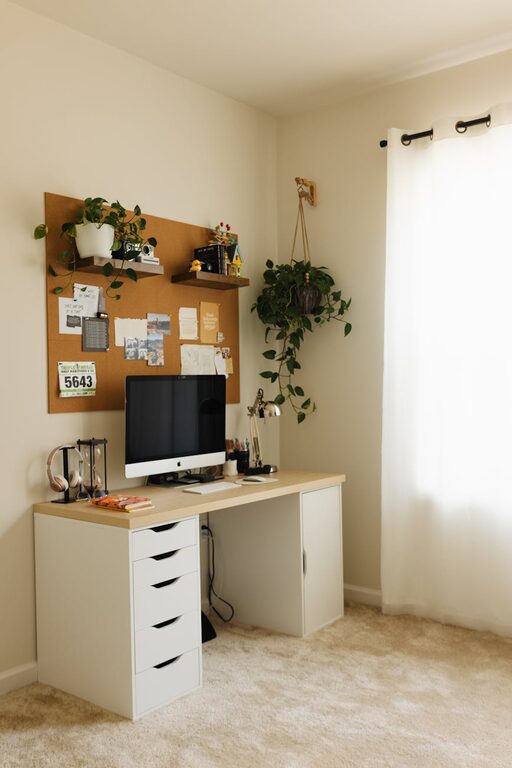
Tips for Creating a Cozy and Productive Home Office Space
Creating a home office that feels both cozy and productive can greatly improve your work-from-home experience. Whether you’re a remote worker, freelancer, or student, having a dedicated space that nurtures focus and comfort is essential. Here are some thoughtful tips to help you design a home office that suits your needs and inspires your best work.
1. Choose the Right Location
Consider Natural Light
Selecting a spot with plenty of natural light can enhance your mood and energy levels. Set up your desk near a window if possible, but avoid glare on your computer screen by positioning it perpendicular to the window.
Minimize Distractions
Find a quiet corner or a room that experiences little foot traffic. This helps reduce noise and interruptions, making it easier to concentrate.
2. Prioritize Comfort with Ergonomic Furniture
Invest in a Comfortable Chair
A supportive chair with adjustable height and backrest keeps you comfortable during long work hours. Pay attention to good lumbar support to prevent back strain.
Choose a Suitable Desk
Depending on your work style, pick a desk height that fits you well. Standing desks or adjustable desks are great options for alternating between sitting and standing.
3. Organize Efficiently
Declutter Your Space
Keep only the essentials on your desk. A clutter-free environment reduces distractions and anxiety.
Use Storage Solutions
Shelves, drawers, and organizers can keep supplies neatly arranged. Label storage bins to find items quickly.
4. Add Personal Touches for Coziness
Decorate with Plants
Indoor plants bring life to your workspace and can improve air quality. Choose low-maintenance plants like succulents or spider plants.
Use Soft Lighting
In addition to natural light, add warm, adjustable lamps. Soft lighting creates a relaxing atmosphere and reduces eye strain.
Incorporate Textiles
A cozy rug, cushioned chair pad, or throw blanket can add texture and warmth to your office.
5. Enhance Productivity with Technology and Tools
Set Up Efficient Technology
Ensure your computer, printer, and other devices are reliable and fast. Use wireless devices to reduce cable clutter.
Use Noise-Canceling Headphones
If you’re in a noisy environment, headphones can help you focus by blocking out background noise.
Utilize Productivity Apps
Apps for task management, time tracking, and note-taking can keep you organized and on schedule.
6. Establish a Routine and Boundaries
Define Your Work Hours
Set clear start and end times to separate work time from personal time.
Create Visual Boundaries
Use room dividers or arrange furniture to signal the office area and help mentally separate work from relaxation.
7. Keep Your Space Fresh and Inviting
Open Windows Regularly
Fresh air can boost your energy and creativity.
Keep Your Workspace Clean
Regularly dust and wipe surfaces to maintain a pleasant environment.
—
Designing a home office that balances comfort and efficiency doesn’t have to be complicated. By paying attention to light, furniture, organization, and atmosphere, you can create a space that helps you thrive professionally while feeling relaxed and at ease. Give these tips a try and customize your office to fit your personal work style and preferences.
